2.Use Google to search webpages that contains some bad words.
2010年10月11日 星期一
Lab 14 Greasemonkey
1. Check the lower right corner of your Firefox and you should find a monkey at the right. Note that you must run the
2.
class blog
http://www.nytimes.com
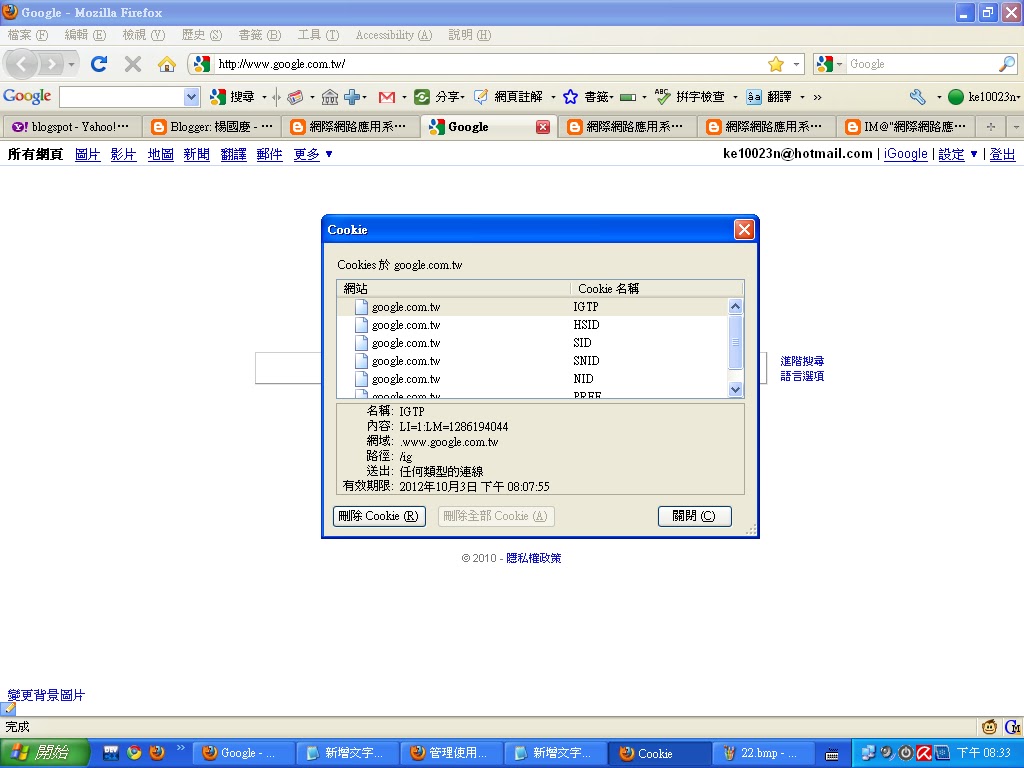
Does our class blog use cookie or not? Does google use cookie?
均有使用!!!
3.
2010年10月4日 星期一
Lab 13: Google Mars
1. Observe how Google Mars loads the map and does the zooming. Is the data downloaded once for all or retrieved on demand?
2. 這個服務的特色有哪些?
讓人們了解原來火星的外部長這樣,充滿趣味,如果其他星球的也可以看到,那就更好了
2. 這個服務的特色有哪些?
讓人們了解原來火星的外部長這樣,充滿趣味,如果其他星球的也可以看到,那就更好了
Lab 11: Using your iGoogle
1.在你的iGoogle 討論群組 Google Group,加入這個討論區 http://groups.google.com/group/mobile-computing
2.在 你的iGoogle 閱讀群組 Google Reader,加入這個部落格 http://minstral.blogspot.com/
Lab 10 Google Docs
1. Go to Google Docs. Google Docs lets you write Word documents through an online web service.
2. Start writing.
3. Publish the Word document.
4. What's the URL of your document.
5. Add the Google Docs to your personal portal. At the portal page, you should be able to see the active documents.
6. Save your document as .doc and .pdf, the two common formats for documents.
郭泓志名留青史
2. Start writing.
3. Publish the Word document.
4. What's the URL of your document.
5. Add the Google Docs to your personal portal. At the portal page, you should be able to see the active documents.
6. Save your document as .doc and .pdf, the two common formats for documents.
郭泓志名留青史
Homework 3
訂閱:
文章 (Atom)